Hardware Requirements in DTP

Hardware Requirements in DTP

Desktop Publishing
1. Hindi Keyboard Keyboard is a very common hardware input device but a convenient, famous and an important device. It has different buttons and keys, by pressing them we can type the data and command the device. Similarly as we type something on the Typewriter. Generally what we type, it shows on our Computer Monitor. There are so many different types of keyboard, but in DTP the keyboard with 104 keys are used. In the DTP we need hindi alphabets too with the english alphabets. That doesn't mean you need another keyboard for the Hindi typing. In real the keyboard is same for all the language. Its fonts change by the change in the language preference. For Example: When you type using any hindi font, i.e Chankaya or Arjuna, then…
Read More
Wireless Security

Wireless Security

Technology
We all like to think we have privacy, even when often we don't. Some people move into the Alaskan outback, 50 miles from the nearest truck stop, to ensure that they have no chance of running into another human being. Others maintain psychological limits while living in dense environment: though Glenn can see neighbors through his kitchen window, through mutual unspoken consent, he and his neighbors never acknowledge each others presence. (Wireless Security) These anecdote illustrate the extremes of wireless networking as well. As long as our wireless networks are isolated, we don't have to worry about others. The minute someone comes within range, our privacy can be compromised. Transmission over wireless networks, because they go through walls, ceilings, floors, and other obstructions, are easily intercepted by consumer-level equipment just…
Read More
Desktop Publishing (DTP)

Desktop Publishing (DTP)

Computer
Despite the challenges faced by electronic media in this era of Internet, the importance of printed materials is never get fade. Books and Newspaper are still a prime source of Communication. The process to print a message or material on paper to reach a large scale of people, is called publishing. The main aim of Publishing is to reach the information to the large number of people in the small number of time. It is surprising that a few decades before the first printing machine was installed in the 15th century, a lot of work has changed in the publishing system. In Traditional System Writer writes. Editor Edits. Composer composites it with letter by letter. Proof Reader checks it. And finally Printing Machine prints it. In this way it travels…
Read More
Working With The Databases

Working With The Databases

Excel
Entering the Data      In Excel Databases we can fill, correct and format the data same as any normal Worksheet or cell. We can also take the benefit of the Data Form in the Excel. You can fill the data in the any form, but keep some precautions.  Firstly, in excel there no facility of field type, therefore we can fill any text, number or date in any field. Sometimes it can be a problem. If you want to write any number which starts with a zero, in Excel Databases that zero will not shown.For example: All the STD codes starts with zero. To show them correctly we have to use the Apostrophe.       Secondly, If you mix the numbers text or date in any of the field, then Excel will…
Read More
Power Supply Circuit

Power Supply Circuit

Computer
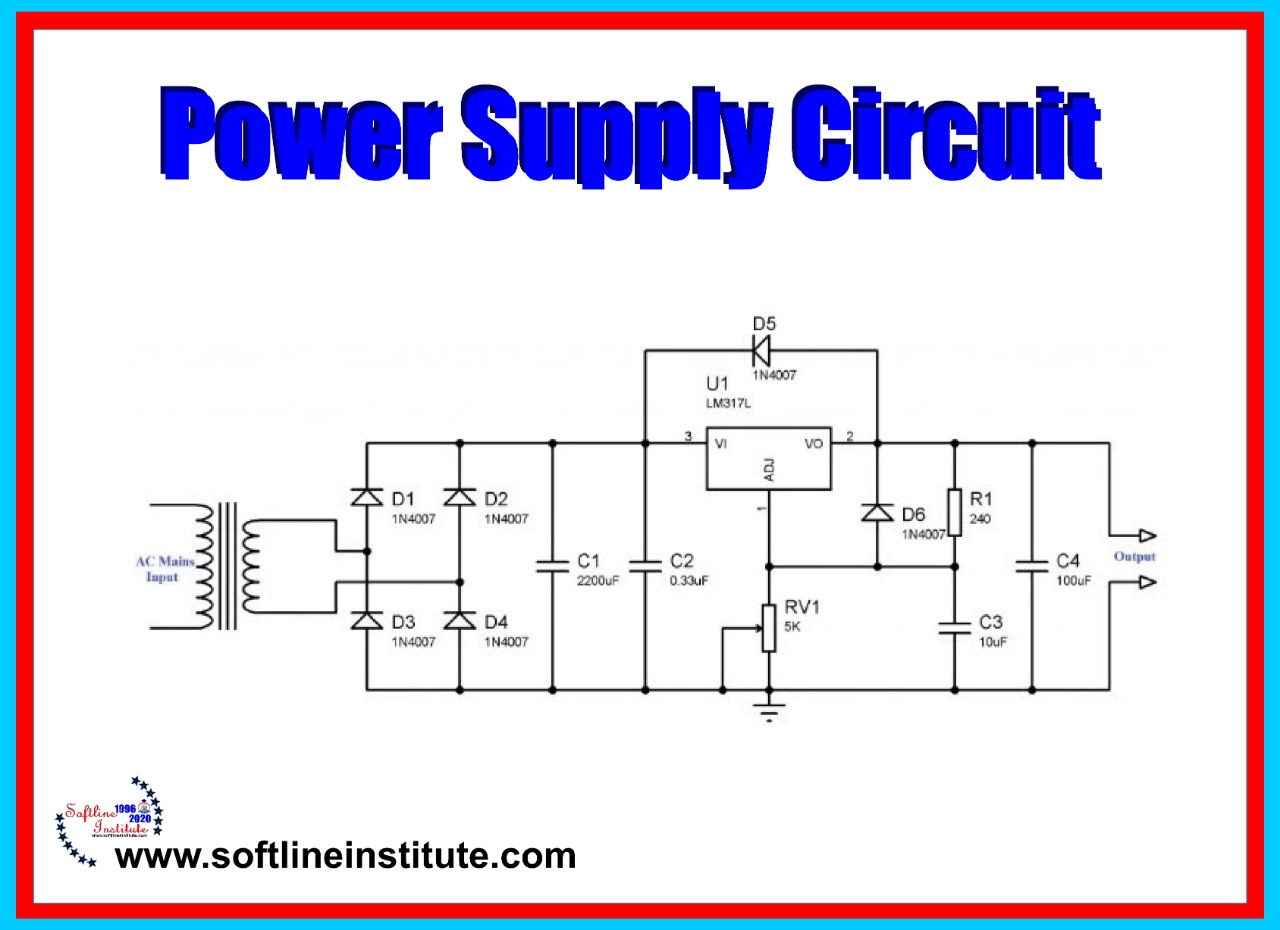
Power supply provides the voltages that printer requires to operate various Printer functions. The printer require 240VAC, +5VDC , +24VDC, and several high voltage DC and AC values that are used by xerographics. The printer AC power cord plugs into a grounded AC wall outlet. The cord carries AC line voltage to the noise filter PWB. The noise Filter smoothes the AC voltage and sends it to the Main Power Switch. Switching on the Main Power Switch applies AC voltage to the AC Driver PWB. And to the Low Voltage Power Supply (LVPS) PWB. The AC Driver PWB is the interface where between printer control (MCU) and the Fuser.Fuser sensors connected to the AC driver PWB send Fuser status information to the Driver PWB, which the PWB routes to the…
Read More
Database in Excel

Database in Excel

Excel
MS Excel is basically a Spreadsheet. And it is better to use it as a spreadsheet. But We can take benefits of different activities for some time by creating the Databases. It is possible in Excel because it is divided into Rows and Column. We can assume any Row a record and any Column a field and can create a Database. There are many conditions included in the Database. For Example: -No. of records should be limited -The Height of Column should not more than 245 etc. Therefore we can't use MS Excel to make all types of databases. For this we can use MS-Access or FoxPro. We can make normal databases in Excel . What is Database in MS Excel? In easy Word, Database is an Organized Collection of…
Read More

Plotter

Computer
Before looking at the different size of plotters available in the market let us see the standard size of the plotter available, these sizes show the maximum size paper that can be used in them. The actual plotter size may be a little bigger then the paper size that can be used on these plotters. Some common paper size and the name used for these sizes are given in the next table. For business applications such as plotting of graph for the business presentation, etc., the A size plotter provides very good quality output. For architectural or engineering application one would require a minimum D or E size plotter. Types Of Plotters Plotters can be divided into different types based on the number of pen divided into different types based…
Read More
Printer Troubleshooting

Printer Troubleshooting

Computer
Ninety percent of the Printer problems are rectified by a non-technical person. Because most of the time the problem is not because of the electronics inside the Printer. Instead most of the fault reported about the printer is due to some mechanical fault in the printer cable. It could also be due to printer not being setup properly. It could be due to some problem in the Software. (troubleshooting) Troubleshooting Dot-Matrix Printer Print Quality Poor -Ribbon Worn Out or Damaged -Print Head Too Close to the Platen -Ribbon drive Assembly Faulty -Print head is faulty No Power to Printer -Fuse has Blown -Faulty Power On-Off Switch -Internal Power Supply has failed -Main Logic Board is Shutting Down the Power Supply Power OK but No Printing -Printer Cable Not Installed Properly…
Read More
Inkjet Printer

Inkjet Printer

Uncategorized
The Inkjet Printer has some characteristics of dot matrix printer (DMP) and some characteristics of laser printer. Similarities in DMP and Inkjet 1. Like the print head of the DMP printer, the inkjet printer use an "Ink Cartridge".2. The inkjet has a carriage mechanism to move the ink cartridge.3. The inkjet has paper fee motor (stepper) to move the paper as it is in a DMP.Similarities in Inkjet and Laser1. Cut sheet paper are used in both the printers.2. Printing quality of the inkjet is similar to that of the laser printer.3. Inkjet and Laser are non-impact printers as there is no direct contact between paper and the print head. Types of Inkjet Printer There are basically two types of Inkjet printers1. Thermal/Bubble Jet2. Mechanical/Peizo Electric Crystal Thermal/Bubble Jet Technology…
Read More
Printers: An Introduction

Printers: An Introduction

Computer
Printers and Monitors are two of the Most common output devices use with the Computer. A Monitor provides us with a "Soft Copy" of our results, the results shown on the monitor is not permanent. The Printer uses to get the Hard Copy of the results. i.e. It is used to get a permanent copy of the result (which can be viewed, filed, and used at a later stage) on the paper or some other media. Today, Printer is capable of high-quality monochrome. That is single color and multicolor printout at a very high speed. Most of the printer are capable of high-quality can produce text as well as graphic images. Printers are often categorized based on the mechanism used by the Printer to print the Image and also they…
Read More