A flatbed scanner is an input device used to scan documents, photographs, drawings, and printed text into a digital format that can be stored and edited on a computer. It has a flat glass surface where the document is placed, and a movable scanning head beneath the glass captures the image using light and sensors. Flatbed scanners are widely used in homes, schools, offices, libraries, and graphic design studios because they provide high-quality and accurate scanning results. Important components of a flatbed scanner include the document lid, glass platen, scan head, light source, mirrors, image sensor, control panel, USB port, and scanning carriage. The scanner works by shining light onto the document, reflecting the image through mirrors and lenses to an image sensor, which converts it into digital data. Flatbed scanners support color scanning, photo scanning, optical character recognition (OCR), and document archiving. They are especially useful for scanning delicate materials such as books, certificates, artwork, and photographs that cannot be passed through sheet-fed scanners.
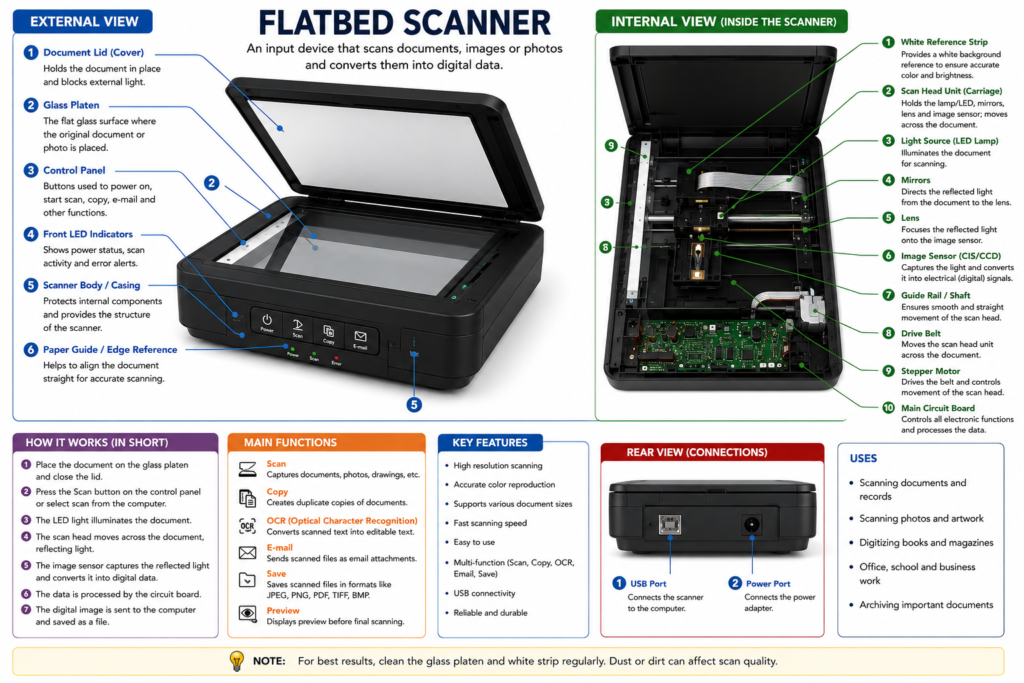
A scanner is an input device used to convert printed documents, photographs, drawings, and text into digital form so they can be stored, edited, or shared on a computer. Scanners work by using a light source and image sensors to capture the image or text placed on the scanning surface. Common types of scanners include flatbed scanners, sheet-fed scanners, handheld scanners, and barcode scanners. A flatbed scanner has a glass platen where the document is placed, while a moving scan head captures the image line by line. Important components of a scanner include the document lid, glass platen, scan head, light source, mirrors, lens, image sensor, control panel, USB port, and main circuit board. Scanners are widely used in schools, offices, banks, libraries, hospitals, and graphic design industries for digitizing documents and preserving records. Modern scanners also support features such as color scanning, OCR (Optical Character Recognition), PDF creation, and high-resolution image scanning for professional-quality output.
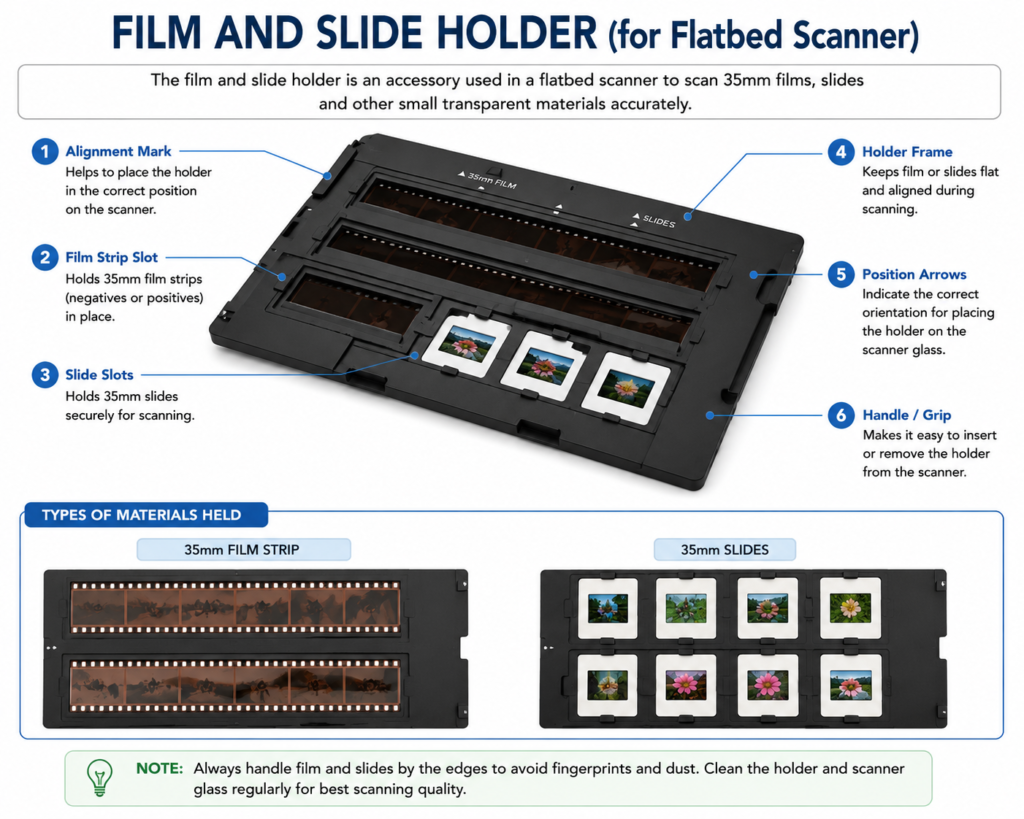
A film and slide holder is an accessory used with a flatbed scanner to scan photographic films, negatives, and slides accurately. It is specially designed to hold 35mm film strips and mounted slides flat and in the correct position during scanning. The holder prevents movement, dust, and bending of the film, helping the scanner produce clear and high-quality digital images. Important parts of a film and slide holder include the film strip slot, slide slots, holder frame, alignment marks, position arrows, and handle or grip. The holder is placed on the scanner glass, and the scanner’s transparency scanning light passes through the film or slide to capture the image. Film and slide holders are commonly used for digitizing old photographs, negatives, and transparencies for storage, editing, and sharing on computers. They are useful for photographers, designers, archivists, and people who want to preserve old memories in digital form.
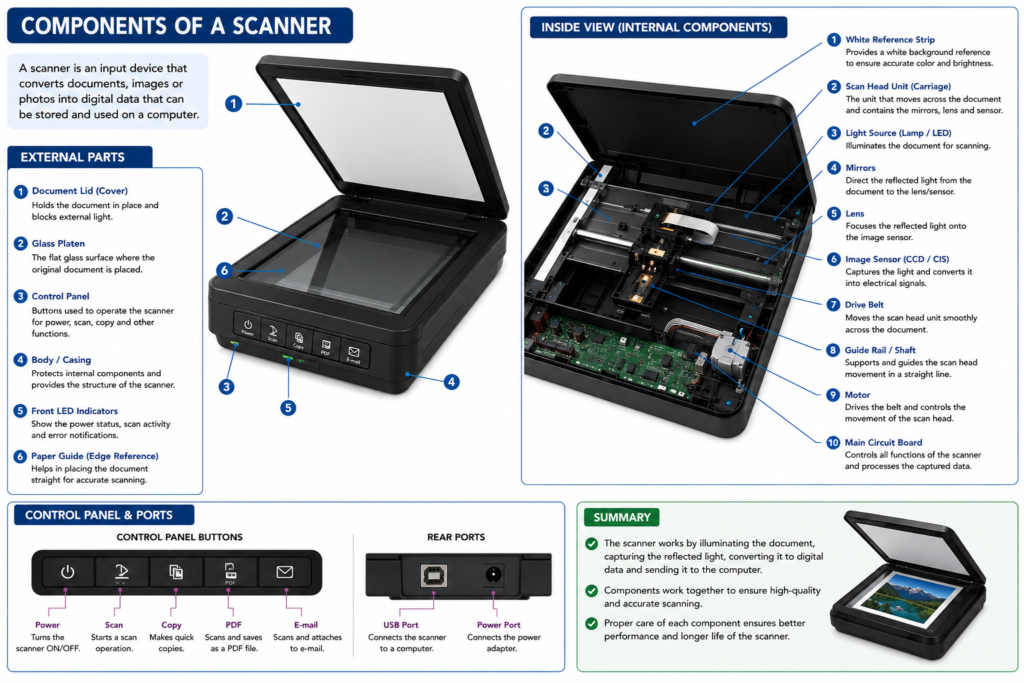
The main components of a scanner work together to capture documents and convert them into digital data. The document lid covers the scanner and blocks outside light during scanning. The glass platen is the flat transparent surface where the document or photo is placed. Inside the scanner, the scan head unit moves across the document and contains important parts such as the light source, mirrors, lens, and image sensor. The light source illuminates the document, while the mirrors and lens direct and focus the reflected light onto the image sensor. The image sensor, usually a CCD or CIS sensor, converts the light into electrical signals that become digital images. Other important components include the guide rail, drive belt, and stepper motor, which help move the scan head smoothly. The control panel contains buttons for scan, copy, and power functions. The main circuit board processes the scanned data and controls scanner operations. Additional parts such as USB ports, power ports, LED indicators, and paper guides help connect and operate the scanner efficiently.
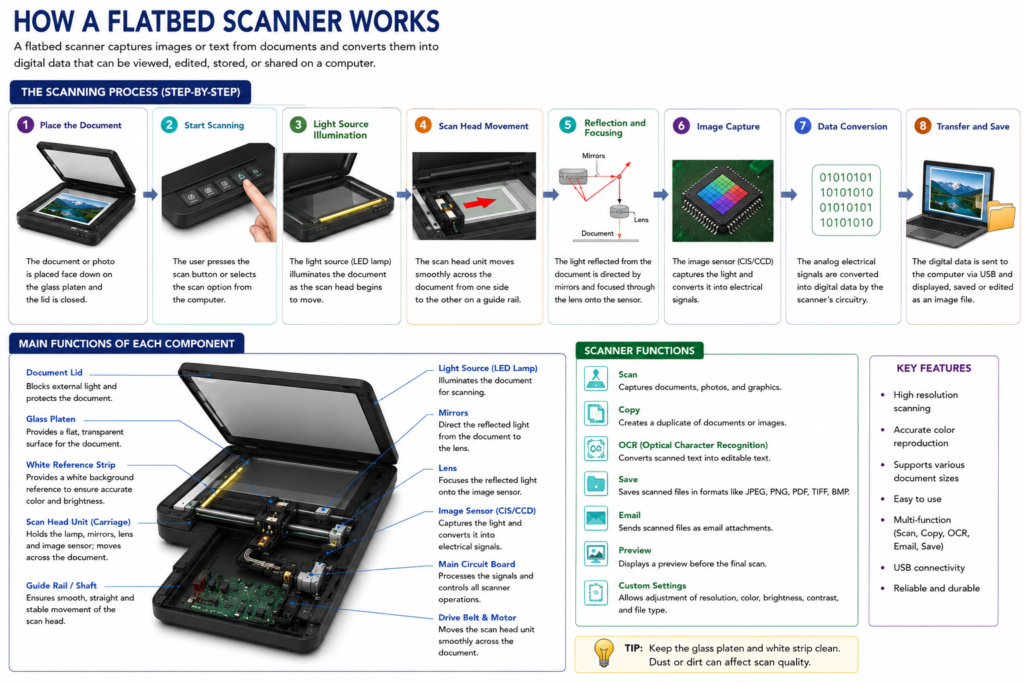
A scanner works by capturing images or text from a physical document and converting them into digital data that can be stored on a computer. First, the user places a document or photograph on the glass platen and closes the lid. When the scan command is given, the scanner’s light source illuminates the document. The scan head unit then moves slowly across the document using a guide rail, drive belt, and motor. As the light reflects from the document, mirrors and lenses direct the reflected light toward the image sensor. The image sensor, usually a CCD or CIS sensor, captures the light and converts it into electrical signals. These signals are processed by the scanner’s circuit board and converted into digital image data. Finally, the scanned image or document is transferred to the computer through a USB or wireless connection and saved in formats such as JPEG, PNG, PDF, or TIFF. This process allows users to edit, print, share, or store the scanned files digitally.